DIY E-Drums with GarageBand
Building a full electronic drum kit from piezo triggers and a DIY rack, converting strikes to MIDI, and driving the sounds from GarageBand on an iPhone with headphones.
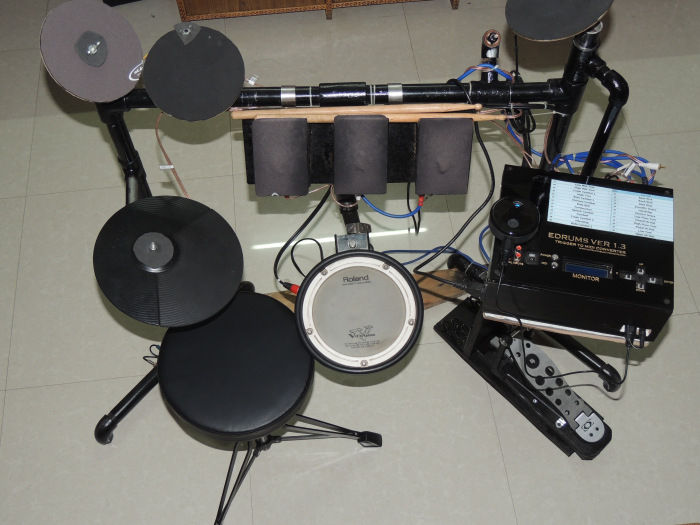
I have always wanted to play drums, but there were practical obstacles. After I bought an acoustic kit, the neighbours objected to the noise, which pushed me towards an electronic alternative I could play silently with headphones.
The whole project is really an exercise in understanding MIDI (Musical Instrument Digital Interface). I first tried infrared sensors to trigger MIDI signals, but the latency was too high, so I switched to analog comparators with piezo sensors instead. The kit has four main parts.
Part 1: Drum rack
The structure is built from GI pipes and aluminium pipes:
- Elbows: 6
- T-joints: 7
- 1 ft pipes: 5
- 2 ft pipe: 1
- 2.5 ft pipe: 1
- Miscellaneous nuts, bolts, and welded angles
Part 2: Drum pads
The pads use piezoelectric sensors sandwiched between sponge and 6mm MDF. The kit includes three toms, plus splash, ride, and crash cymbals. A Roland PDX-6 serves as the snare and a CY-5 as the hi-hat.
The bass-drum trigger modifies a Pluto acoustic drum pedal by adding a piezoelectric sensor mounted on an L-shaped plywood platform with sponge cushioning. The hi-hat pedal uses a basic potentiometer (volume) pedal with an LDR-LED setup to control the open and closed positions.
Part 3: Trigger-to-MIDI converter
For this component I relied on Admir Salahovic’s open-source drum-trigger converter project at edrum.info as the primary resource.
Part 4: MIDI-to-sound conversion
There are three options:
- Feed the MIDI signals to a PC running software like Propellerhead Reason, Ableton Live, Sonar LE, or GarageBand. This needs a MIDI-to-USB converter and a good sound card to keep latency low.
- Use a sound module with MIDI input, including DIY options like SamplerBox or Zynthian, or a drum machine like the Alesis SR16/SR18.
- Connect to an iPhone or iPad running GarageBand, via a MIDI-to-USB converter or BLE MIDI (Bluetooth Low Energy MIDI) using a Zivix PUC+ converter.
I went with GarageBand on iOS, which lets me practise on headphones with studio-quality sounds and zero complaints from the neighbours.
Originally published on sslabs.in.